
The hidden habits that slow down JavaScript developers and the mindset shifts that help you truly master the language.
Almost every developer remembers their first experience with JavaScript.
Maybe it started with a simple alert("Hello World"), a button click handler, or a small interactive webpage. At first, everything seemed simple. But as projects grew larger, JavaScript began revealing its quirks, unexpected behaviors, confusing errors, and patterns that didn’t behave the way you expected.
Most developers make the same mistakes when learning JavaScript, and many of these mistakes persist for years.
They’re not obvious bugs. They’re bad habits and misunderstandings that quietly limit your ability to write clean, scalable, and maintainable code.
The good news? Once you recognize these mistakes, you can fix them, and your JavaScript skills will level up dramatically.
In this article, we’ll explore five common mistakes developers make when learning JavaScript, why they happen, and how you can correct them to become a stronger developer.
1. Treating JavaScript Like a Simple Scripting Language
The Mistake
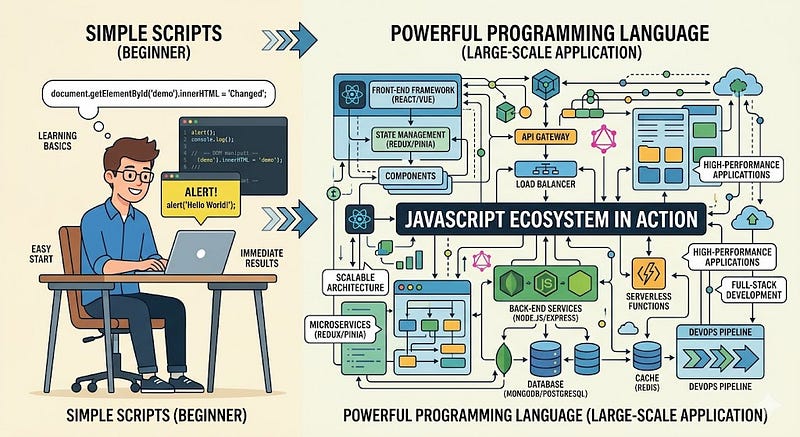
Many beginners assume JavaScript is just a small scripting language used for minor browser tasks.
Because it started as a way to add simple interactions to websites, developers often underestimate its depth.
They write quick scripts, copy code snippets, and move on without learning the underlying concepts.
Why This Happens
JavaScript feels easy at the beginning.
You can quickly build things like:
- Button click handlers
- Form validation
- Simple animations
- DOM manipulation
Because of this quick feedback loop, developers often skip learning core programming concepts.
The Problem
As projects grow larger, this shallow understanding becomes a serious limitation.
Without deeper knowledge, developers struggle with:
- application architecture
- asynchronous behavior
- modular code design
- debugging complex problems
JavaScript isn’t just a scripting language anymore; it powers entire platforms, including:
- web applications
- backend servers
- mobile apps
- desktop software
Example
A beginner might write something like this:
function calculateTotal(price, tax) {
  return price + tax;
}
This works, but doesn’t account for validation, formatting, or edge cases.
A more thoughtful approach would be:
function calculateTotal(price, tax) {
  if (typeof price !== "number" || typeof tax !== "number") {
    throw new Error("Invalid input");
  }

  return Number((price + tax).toFixed(2));
}
Why the Fix Matters
Professional developers treat JavaScript as a full programming language, not a quick scripting tool.
Pro Tip
Spend time learning:
- JavaScript fundamentals
- execution context
- closures
- prototypes
- the event loop
Understanding these concepts changes the way you write code.
2. Ignoring Asynchronous JavaScript
The Mistake
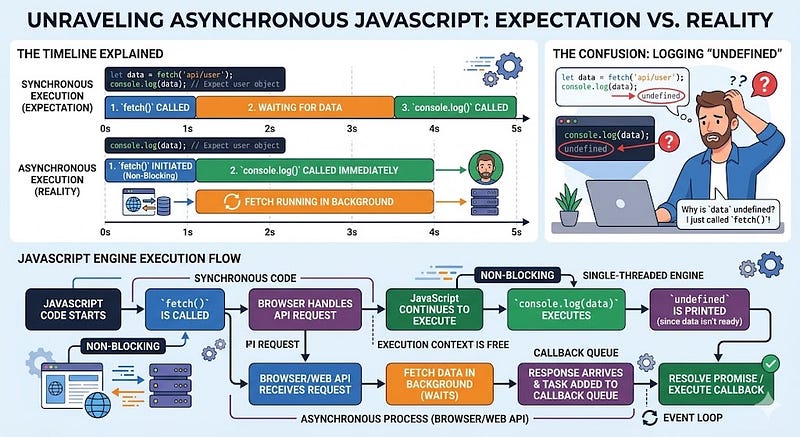
Many developers initially write JavaScript as if it were synchronous, expecting code to run line by line.
But JavaScript heavily relies on asynchronous behavior, especially in modern applications.
Example of the Problem
Consider this code:
let data;

fetch("/api/users")
  .then(response => response.json())
  .then(result => {
    data = result;
});

console.log(data);
The developer expects the API data to print.
But instead, the output is:
undefined
Why This Happens
The fetch request runs asynchronously.
While the request is awaiting a response, the rest of the code continues to execute.
The Solution
Use async/await to write asynchronous code more clearly.
async function loadUsers() {
  const response = await fetch("/api/users");
  const data = await response.json();
  console.log(data);
}

loadUsers();
Why This Matters
Understanding async behavior helps you manage:
- API calls
- database queries
- file operations
- user interactions
Without this knowledge, debugging becomes extremely difficult.
Pro Tip
Learn these core async tools:
- Promises
- async/await
- error handling with try/catch
- the event loop
Once you understand them, your code becomes much more predictable.
3. Overusing Global Variables
The Mistake
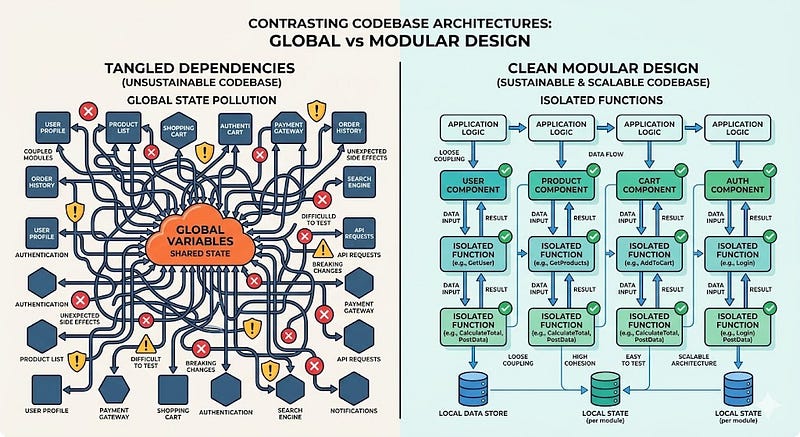
Beginners often declare variables globally because it’s convenient.
let userData;
let cartItems;
let totalPrice;
These variables are accessible throughout the application.
Why This Is Dangerous
Global variables create several problems:
- name conflicts
- unexpected mutations
- difficult debugging
- poor code organization
Imagine a large application where multiple modules modify the same variable.
Tracking down bugs becomes extremely frustrating.
Better Approach
Use local scope and modular design.
function calculateCartTotal(items) {
  let total = 0;

  items.forEach(item => {
    total += item.price;
  });
  return total;
}
Or use modules:
export function calculateCartTotal(items) {
  return items.reduce((total, item) => total + item.price, 0);
}
Why This Works
Encapsulation ensures that variables exist only where they are needed.
This makes code easier to maintain and debug.
Pro Tip
Modern JavaScript offers tools to manage scope effectively:
letandconst- ES modules
- closures
Avoid globals whenever possible.
4. Not Understanding “this”
The Mistake
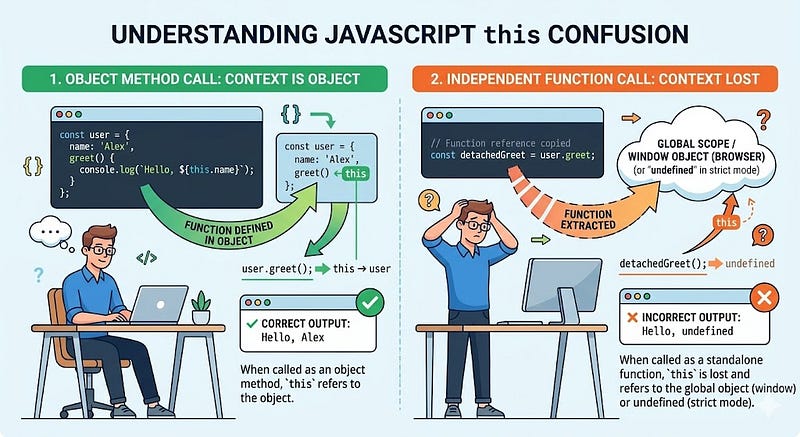
The this keyword is one of the most confusing parts of JavaScript.
Many beginners assume this always refers to the object the function belongs to.
But in JavaScript, this depends on how the function is called, not where it is defined.
Example
const user = {
  name: "Ali",
  greet: function() {
    console.log(this.name);
  }
};

user.greet();
This prints:
Ali
Now consider:
const greet = user.greet;
greet();
Output:
undefined
Why This Happens
The function lost its original context.
When called independently, this refers to the global object (or undefined in strict mode).
Fix
Use arrow functions or .bind() when necessary.
Example:
const greet = user.greet.bind(user);
greet();
Why This Matters
Understanding this is critical when working with:
- event handlers
- object methods
- class components
- callbacks
Pro Tip
Learn the four rules of this:
- Global context
- Object method context
- Constructor context
- Explicit binding (
call,apply,bind)
Once these rules are in place, many confusing bugs disappear.
5. Copy-Pasting Code Without Understanding It

The Mistake
Stack Overflow and tutorials are incredibly helpful, but many developers rely on them too heavily.
Instead of understanding the solution, they copy code and move on.
Why This Is Risky
Copied code often includes:
- hidden dependencies
- outdated syntax
- performance issues
- security vulnerabilities
It may work in the short term, but create long-term problems.
Example
A developer might copy a debounce function like this:
function debounce(func, delay) {
  let timer;

  return function() {
    clearTimeout(timer);
    timer = setTimeout(() => func(), delay);
  };
}
Without understanding:
- closures
- timers
- function scope
They won’t know how to modify it or debug it later.
Better Approach
When you encounter unfamiliar code:
- Break it into smaller parts
- Test each piece
- Understand the underlying concept
For example, learning closures will help you understand why the debounce function works.
Why This Matters
Developers who truly understand their code can:
- debug faster
- optimize performance
- build better abstractions
Pro Tip
Whenever you copy code, ask yourself:
- What problem does this solve?
- How does each part work?
- Could I implement this myself?
If you can answer these questions, you’ve actually learned something.
Conclusion
Learning JavaScript is a journey filled with experiments, mistakes, and breakthroughs.
The mistakes we discussed are incredibly common, but recognizing them is the first step toward becoming a better developer.
Let’s recap the five biggest pitfalls:
- Treating JavaScript like a simple scripting language
- Ignoring asynchronous programming
- Overusing global variables
- Misunderstanding the
thiskeyword - Copy-pasting code without understanding it
These mistakes don’t mean you’re a bad developer.
They’re simply part of the learning process.
The key difference between average developers and great developers is curiosity, the willingness to dig deeper and understand how things truly work.
When you start focusing on concepts instead of shortcuts, your JavaScript skills grow exponentially.
Soon, you’ll find yourself writing cleaner code, solving problems faster, and building applications with confidence.
What mistake slowed down your JavaScript learning the most?
Share your experience in the comments; it might help another developer avoid the same struggle.
If you found this article helpful, save it, share it with fellow developers, and follow for more programming insights.








Leave a Reply