
Hidden API mistakes that quietly destroy performance, reliability, and developer sanity, and how to fix them.

Introduction
APIs are the backbone of modern applications. Every login, payment, notification, and dashboard update probably depends on an API call somewhere.
But here’s the problem: many API mistakes don’t break your app immediately. Instead, they quietly degrade performance, introduce security risks, and create maintenance nightmares later.
You might ship a feature that works perfectly today, only to discover months later that your API design makes scaling painful, debugging impossible, and frontend integration frustrating.
In this article, we’ll explore 5 common API mistakes developers make without realizing it, why they happen, and how to fix them with practical strategies and examples.
If you build APIs or consume them (which most developers do), these lessons can save you countless hours of debugging and refactoring.
1. Returning Inconsistent Response Structures
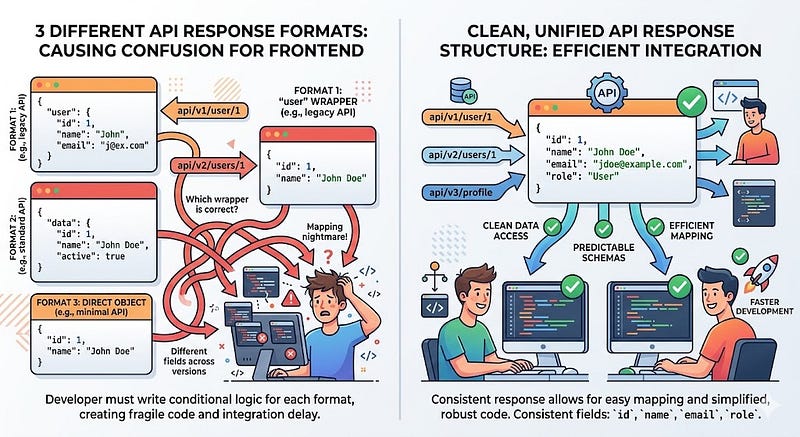
One of the most common API design mistakes is returning different response formats for similar endpoints.
For example, one endpoint might return a data field while another returns user or result.
Example of the Problem
{
  "user": {
    "id": 1,
    "name": "Ali"
  }
}
Another endpoint:
{
  "data": {
    "id": 1,
    "name": "Ali"
  }
}
Or even worse:
{
  "id": 1,
  "name": "Ali"
}
This inconsistency forces frontend developers to constantly adjust parsing logic.
Why This Is a Problem
Inconsistent structures lead to:
- More conditional logic in frontend code
- Harder API documentation
- Increased bugs during integration
- Poor developer experience
Better Approach
Adopt a consistent API response structure across all endpoints.
Example:
{
  "success": true,
  "data": {
    "id": 1,
    "name": "Ali"
  },
  "error": null
}
For errors:
{
  "success": false,
  "data": null,
  "error": "User not found"
}
Why This Works
Consistency allows developers to:
- Reuse API handling logic
- Build predictable frontend services
- Debug faster
Pro Tip
Create a shared response utility in your backend framework to enforce a consistent structure across all responses.

2. Ignoring Proper HTTP Status Codes
Many APIs return 200 OK for everything, including errors.
Yes, the request technically returned something, but it completely breaks the purpose of HTTP status codes.
Example of the Mistake
{
  "status": "error",
  "message": "Invalid password"
}
But the server still returns:
200 OK
Now the frontend must manually check every response.
Why This Is Bad
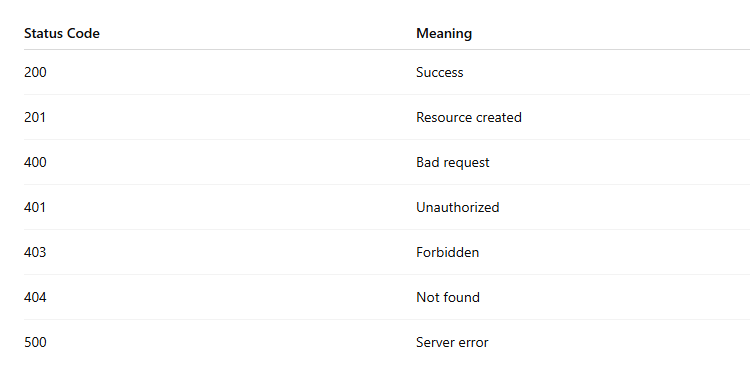
Proper HTTP codes allow tools and applications to understand what happened automatically.
Some important ones include:
Correct Example
When a resource isn’t found:
404 Not Found
Response:
{
  "error": "User not found"
}
Why This Works
Correct status codes allow:
- Better debugging
- Proper error handling
- Improved monitoring
- Clear API communication
Pro Tip
Many frameworks allow automatic HTTP status handling; use them instead of manually returning 200 responses.
3. Fetching Too Much (Or Too Little) Data
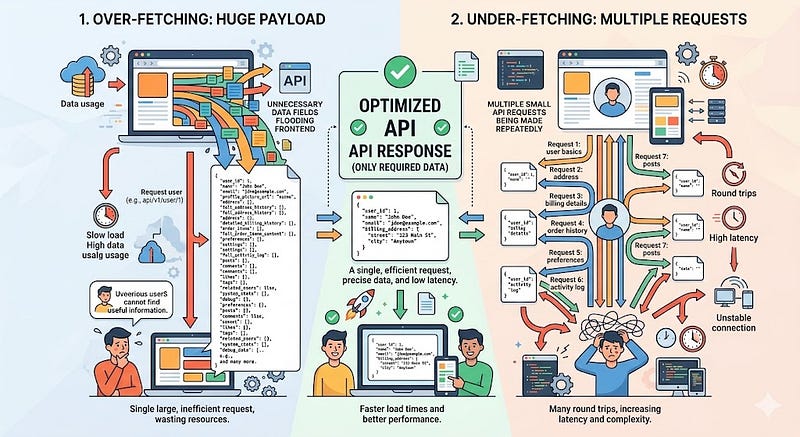
A poorly designed API often sends too much data or too little data, forcing additional requests.
Both problems hurt performance.
Over-fetching Example
An endpoint returns full user data:
{
  "id": 1,
  "name": "Ali",
  "email": "ali@example.com",
  "address": "...",
  "preferences": "...",
  "orderHistory": "...",
  "notifications": "..."
}
But the frontend only needs:
name
avatar
Under-fetching Example
The frontend must call multiple APIs:
GET /users
GET /users/1/profile
GET /users/1/orders
GET /users/1/notifications
Now one screen triggers four requests.
Better Approach
Design APIs based on actual UI requirements.
Example:
GET /users?fields=name,avatar
Response:
{
  "name": "Ali",
  "avatar": "/avatars/1.png"
}
Or design specialized endpoints:
GET /dashboard-data
Why This Works
Optimized responses reduce:
- Network requests
- Loading time
- Server load
- Frontend complexity
Pro Tip
If your API has complex data needs, consider GraphQL or flexible query parameters.
4. Poor Error Messages
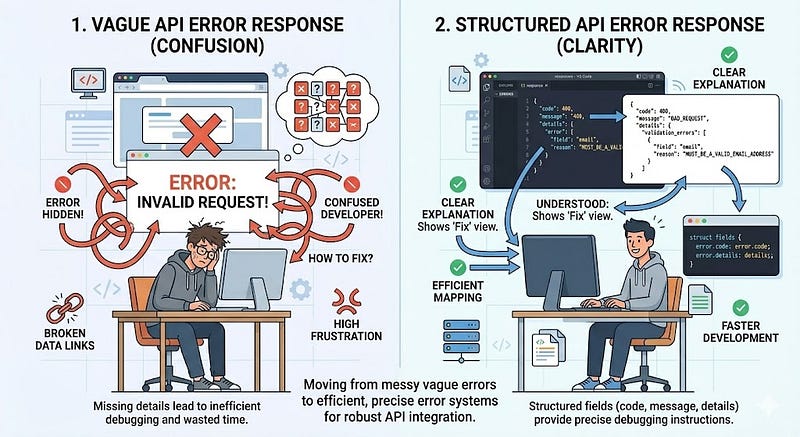
Many APIs return completely useless and technically correct errors.
Example:
{
  "error": "Invalid request"
}
What does that even mean?
Why This Is a Problem
Bad error messages slow down debugging.
Developers waste time guessing:
- Was it authentication?
- Validation?
- Missing fields?
- Database failure?
Better Error Messages
Provide specific and actionable feedback.
Example:
{
  "error": "Validation failed",
  "details": {
    "email": "Email format is invalid",
    "password": "Password must be at least 8 characters"
  }
}
Why This Works
Clear error messages help developers:
- Fix issues quickly
- Build better UI validation
- Reduce support requests
Pro Tip
Use structured error formats with fields like:
codemessagedetails
Example:
{
  "code": "VALIDATION_ERROR",
  "message": "Invalid input",
  "details": {}
}

5. Forgetting About API Versioning
APIs evolve over time.
New features get added, fields change, and sometimes old endpoints must be removed.
Without versioning, you risk breaking every client application instantly.
The Problem
Imagine you change this response:
{
  "name": "Ali"
}
to:
{
  "fullName": "Ali Ahmed"
}
Suddenly, every frontend app breaks.
Solution: Version Your API
Example:
/api/v1/users
/api/v2/users
Versioning ensures that:
- Old apps keep working
- New apps get improvements
- Breaking changes are controlled
Why This Works
API versioning provides:
- Backward compatibility
- Safer deployments
- Predictable upgrades
Pro Tip
Only create a new version when breaking changes occur.
Conclusion
APIs are more than just endpoints; they’re contracts between systems.
When APIs are poorly designed, the cost shows up later as:
- Difficult debugging
- Frustrated frontend developers
- Performance problems
- Painful refactors
Avoiding these five common mistakes will instantly improve your API quality:
✔ Maintain consistent response structures
✔ Use proper HTTP status codes
✔ Avoid over-fetching and under-fetching data
✔ Provide clear and helpful error messages
✔ Always version your APIs
Small improvements in API design can have massive long-term benefits for scalability, maintainability, and developer experience.
The best APIs are the ones developers don’t have to fight with.
What’s the worst API design you’ve ever encountered?
Share your experience in the comments. I’d love to hear your story.
If this article helped you, save it for later, share it with fellow developers, and follow for more practical engineering insights.








Leave a Reply