
Hard technical lessons about indexing, schema design, transactions, scaling, and data integrity are explained clearly so you can build faster, safer, and more scalable systems.
10 Database Mistakes I Made
Databases rarely fail dramatically.
They degrade.
Slow queries.
Lock contention.
Strange data inconsistencies.
Scaling issues that appear “out of nowhere.”
Most of these problems aren’t caused by the database engine.
They’re caused by design decisions.
In this article, I’ll break down 10 database mistakes I made early in my backend development journey and, more importantly, the principles that fixed them.
This applies whether you’re using:
- PostgreSQL
- MySQL
- SQL Server
- MongoDB
- Or any relational database
Let’s get into it.
1. Not Adding Indexes (or Adding Too Many)

Indexes are the most misunderstood performance tool in databases.
The Mistake
Either:
- Not creating indexes at all
- Or creating indexes on almost every column
Both are wrong.
Why Missing Indexes Hurt
Without an index:
SELECT * FROM users WHERE email = 'john@example.com';
The database performs a full table scan.
Text diagram:
Row 1 → check
Row 2 → check
Row 3 → check
...
Row 1,000,000 → check
Time complexity: O(n)
With an index:
Index Lookup → Direct Pointer → Row
Time complexity: O(log n)
The Other Problem: Too Many Indexes
Indexes:
- Slow down INSERTs
- Slow down UPDATEs
- Increase storage
- Increase maintenance cost
What I Do Now
Create indexes on:
- Columns used in
WHERE - Columns used in
JOIN - Columns used in
ORDER BY - Foreign keys
Avoid indexing:
- Low-selectivity columns (like boolean flags)
- Columns rarely queried
Measure with EXPLAIN before and after. Always.
2. Using SELECT * in Production Queries
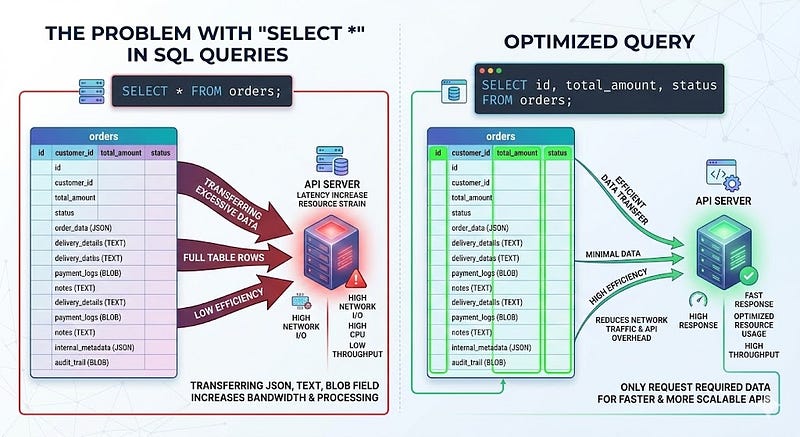
It’s convenient.
It’s fast to write.
It’s expensive to run.
SELECT * FROM orders WHERE user_id = 42;
Why It’s a Problem
- Pulls unnecessary columns
- Transfers more data over the network
- Slows serialization
- Breaks caching predictability
If your table has:
- JSON columns
- Text blobs
- Large metadata fields
You’re paying for them every time.
Better Approach
SELECT id, total_amount, status
FROM orders
WHERE user_id = 42;
Only select what you need.
This becomes critical in high-traffic APIs.
3. Not Using Transactions for Atomic Operations
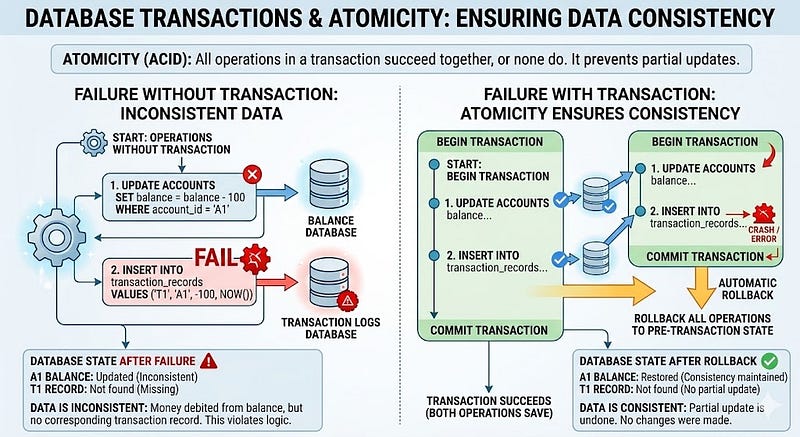
If two operations must succeed together, they belong in a transaction.
The Risk
Without a transaction:
UPDATE accounts SET balance = balance - 100 WHERE id = 1;
INSERT INTO transactions (...) VALUES (...);
If the second query fails:
- Balance is reduced
- No transaction record exists
Data inconsistency.
Correct Approach
BEGIN;

UPDATE accounts
SET balance = balance - 100
WHERE id = 1;

INSERT INTO transactions (...) VALUES (...);

COMMIT;
Or rollback on failure.
Atomicity is not optional in financial or critical workflows.
4. Ignoring Proper Schema Design
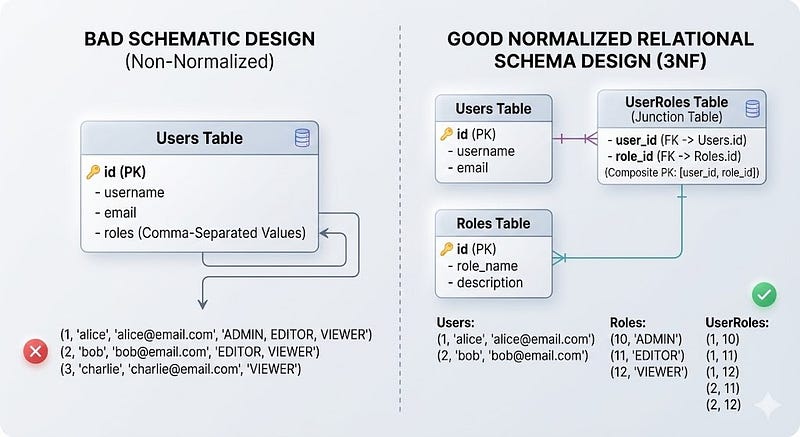
Schema design is architecture.
Bad schema = permanent pain.
Common Early Mistakes
- Storing comma-separated values in a column
- Duplicating data across tables
- Poor naming conventions
- No foreign key constraints
Example of a bad pattern:
users
- id
- name
- roles (admin,editor,viewer)
Instead of:
users
user_roles
roles
Why It Matters
- Harder queries
- Data inconsistencies
- No referential integrity
- Impossible constraints
Now I:
- Normalize properly
- Use foreign keys
- Use clear naming
- Model relationships explicitly
5. Over-Normalizing Everything

Normalization is powerful.
Over-normalization is painful.
Example:
orders
order_items
item_details
item_categories
item_category_mappings
item_tags
item_tag_mappings
A simple query becomes:
SELECT ...
FROM orders
JOIN order_items ...
JOIN item_details ...
JOIN item_categories ...
The Trade-Off
- Highly normalized → clean data
- Highly normalized → heavy joins
What I Learned
Normalize for integrity.
Denormalize strategically for performance.
Sometimes, a read-optimized summary table is better than 6 joins.
6. Ignoring Query Execution Plans
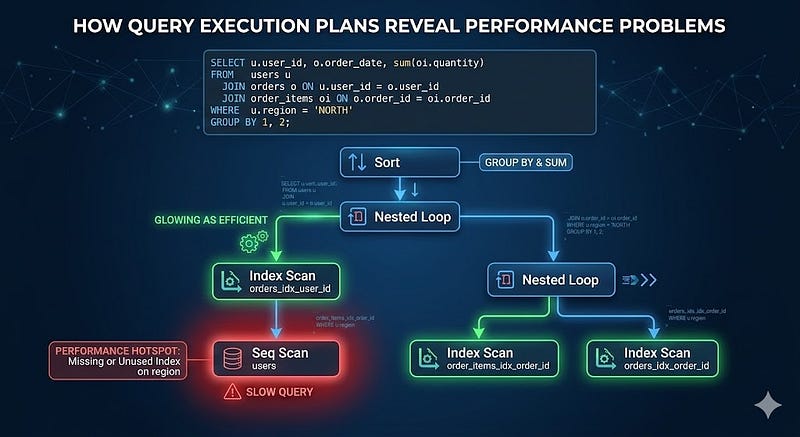
You can’t optimize what you don’t measure.
Many slow queries look fine at the surface level.
But the execution plan reveals the truth.
EXPLAIN ANALYZE
SELECT * FROM users WHERE email = 'john@example.com';
If you see:
Seq Scan on users
It means:
Full table scan.
Things to Watch For
- Sequential scans on large tables
- Nested loops with high row counts
- Mismatched row estimates
- Missing indexes
Execution plans are your X-ray machine.
7. Not Handling the N+1 Query Problem
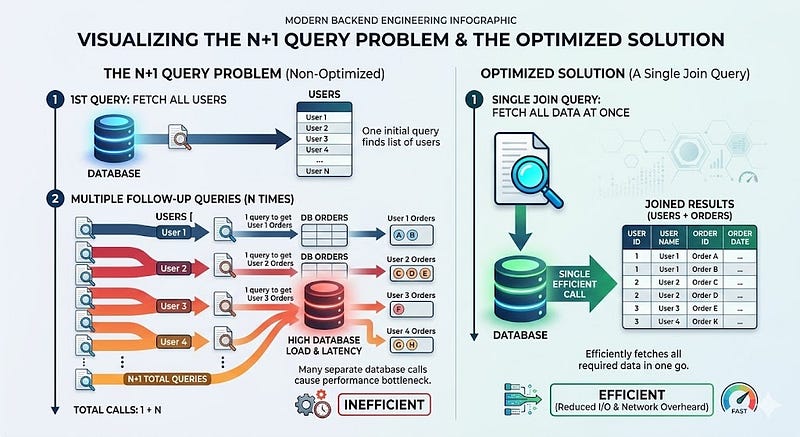
This is common in ORMs.
Example:
const users = await db.users.findAll();

for (const user of users) {
  const orders = await db.orders.findAll({ userId: user.id });
}
If there are 100 users:
- 1 query for users
- 100 queries for orders
Total: 101 queries
Better Approach
Use JOIN:
SELECT *
FROM users
LEFT JOIN orders ON users.id = orders.user_id;
Or eager loading in ORM.
The difference is dramatic in production.
8. Storing Everything in JSON Columns

JSON fields are flexible.
Too flexible.
Example:
ALTER TABLE users ADD COLUMN metadata JSONB;
And then:
{
  "subscription": {...},
  "preferences": {...},
  "flags": {...}
}
The Hidden Cost
- Harder indexing
- Slower filtering
- Poor constraints
- Complicated migrations
Rule I Follow
Use JSON for:
- Optional metadata
- Rarely filtered fields
Use structured columns for:
- Frequently queried data
- Business-critical fields
- Relational relationships
If you’re filtering on it regularly, it probably deserves a column.
9. Skipping Backup and Restore Testing

Backups are not optional.
But here’s the real mistake:
Having backups but never testing restore.
A backup that cannot restore is useless.
Best Practices
- Daily automated backups
- Transaction log backups
- Offsite storage
- Test restore quarterly
- Monitor backup success
Your database is your business.
Treat it like it.
10. Not Understanding Isolation Levels and Concurrency

Concurrency bugs are subtle and dangerous.
Consider this scenario:
Two users try to purchase the last item simultaneously.
Both run:
SELECT stock FROM products WHERE id = 1;
Stock = 1
Both proceed.
Oversold.
The Solution
Use locking:
SELECT stock
FROM products
WHERE id = 1
FOR UPDATE;
Or use optimistic locking with version columns.
Isolation Levels Matter
- Read Committed
- Repeatable Read
- Serializable
Understand what your database defaults to.
Design accordingly.
Key Takeaways
Here are the core lessons from these 10 mistakes:
- Indexes are powerful, but must be strategic
- Avoid
SELECT *in production APIs - Use transactions for atomic workflows
- Design the schema carefully
- Normalize intelligently
- Always inspect execution plans
- Fix N+1 queries early
- Don’t abuse JSON columns
- Backups must be tested
- Concurrency must be handled deliberately
Databases are not just storage engines.
They are consistency engines.
They are performance engines.
They are scalability engines.
What You Should Do Next
Here’s a practical checklist:
- Run
EXPLAIN ANALYZEon your slowest queries. - Audit your indexes.
- Remove unnecessary
SELECT *queries. - Check for N+1 patterns.
- Review transaction usage.
- Confirm your backup restore process works.
- Understand your isolation level defaults.
If you’re serious about backend engineering, mastering database fundamentals will give you more leverage than learning another framework.
Final Thoughts
Every backend system eventually becomes a database problem.
The earlier you understand indexing, schema design, transactions, and concurrency, the fewer production surprises you’ll face.
If this article helped you think differently about database design, share it with a fellow developer who cares about building systems that scale.
Follow for more practical backend engineering deep dives.







Leave a Reply