
Slow Node.js apps usually come from inefficient patterns, not the runtime itself. These 7 practical tips will help you improve performance, scalability, and responsiveness.

Introduction
Node.js is known for its high performance and non-blocking architecture, but many applications still suffer from slow responses, high memory usage, and poor scalability.
The reason is rarely Node.js itself. More often, it’s inefficient code patterns, blocking operations, or poor resource management.
In this article, you’ll learn 7 practical tips to make your Node.js apps faster, more efficient, and production-ready.
These techniques are widely used in real-world applications and can dramatically improve performance.
1. Avoid Blocking the Event Loop
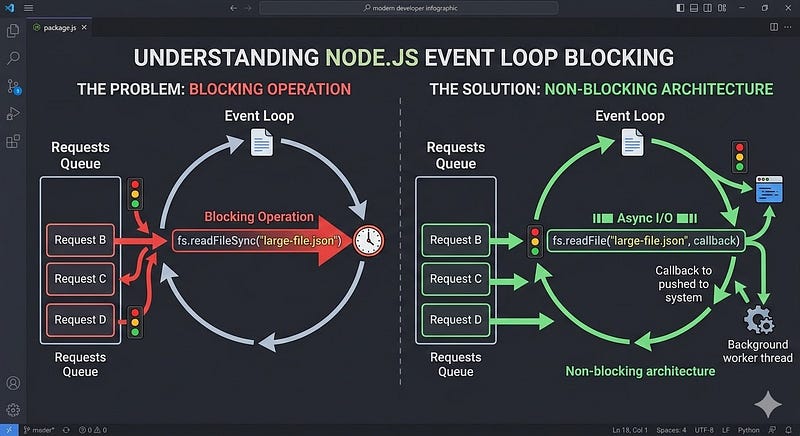
Node.js runs on a single-threaded event loop. If a task blocks it, the entire application slows down.
Problem Example
const fs = require("fs");

const data = fs.readFileSync("large-file.json"); // blocking
console.log(data);
This blocks the event loop until the file is read.
Better Approach
const fs = require("fs");

fs.readFile("large-file.json", "utf8", (err, data) => {
  if (err) throw err;
  console.log(data);
});
Or with promises:
const fs = require("fs/promises");

async function readFile() {
  const data = await fs.readFile("large-file.json", "utf8");
  console.log(data);
}
Key Insight
Avoid synchronous APIs like:
fs.readFileSynccrypto.pbkdf2Synczlib.deflateSync
These can freeze your entire server.
2. Use Caching to Reduce Repeated Work

Repeated database queries or expensive computations slow down apps.
Caching avoids doing the same work multiple times.
Example: In-Memory Cache
const cache = new Map();

async function getUser(id) {
  if (cache.has(id)) {
    return cache.get(id);
  }
  const user = await db.findUser(id);
  cache.set(id, user);
  return user;
}
Common Caching Tools
- Redis
- Node-cache
- LRU cache
Caching can reduce response times dramatically.
3. Use Compression Middleware

Compressing responses reduces payload size and improves load times.
Example Using Express
const express = require("express");
const compression = require("compression");

const app = express();
app.use(compression());
This automatically compresses responses using:
- Gzip
- Brotli
Benefits
- Faster network transfer
- Better performance for APIs and web apps
4. Optimize Database Queries
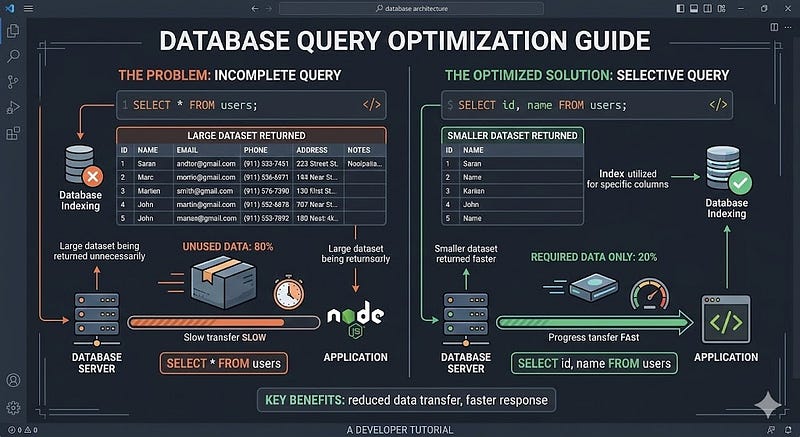
Many slow Node.js apps are actually slow database apps.
Common Problems
- Fetching unnecessary data
- Missing indexes
- Too many queries
Example
Instead of:
SELECT * FROM users;
Use:
SELECT id, name FROM users;
Best Practices
- Add database indexes
- Avoid N+1 queries
- Use query limits
- Batch database requests
Optimizing queries often delivers the largest performance gains.
5. Use Streams for Large Data
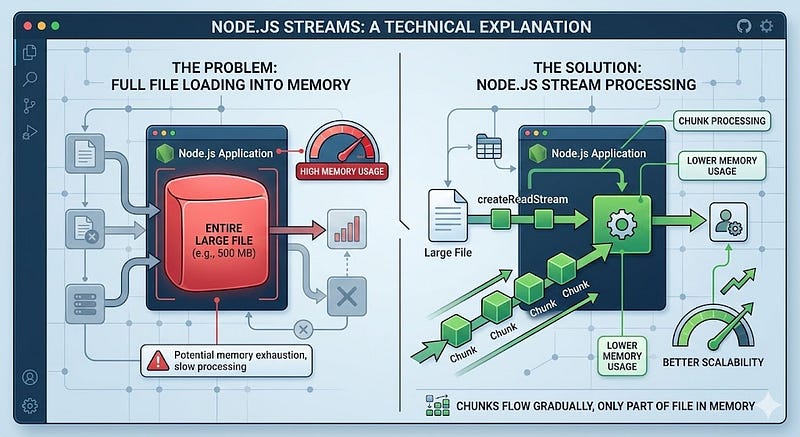
Loading large files into memory can slow down applications.
Streams process data in chunks instead.
Example
const fs = require("fs");

const stream = fs.createReadStream("large-file.txt");

stream.on("data", chunk => {
  console.log(chunk);
});
Benefits
- Lower memory usage
- Faster processing
- Better scalability
Streams are especially useful for:
- file uploads
- file downloads
- large data processing
6. Use a Process Manager
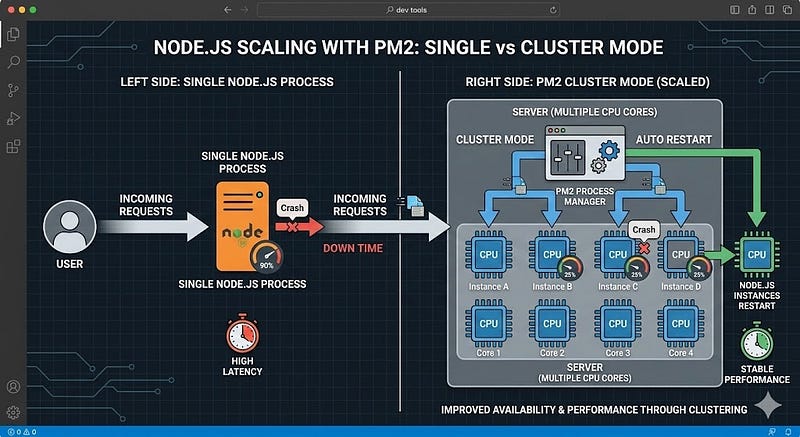
Production Node.js apps should run with a process manager.
One popular option is PM2.
Example
npm install pm2 -g
pm2 start app.js
PM2 provides:
- automatic restarts
- load balancing
- monitoring
- clustering
Cluster Example
pm2 start app.js -i max
This uses all CPU cores, improving performance for high traffic.
7. Monitor Performance and Bottlenecks
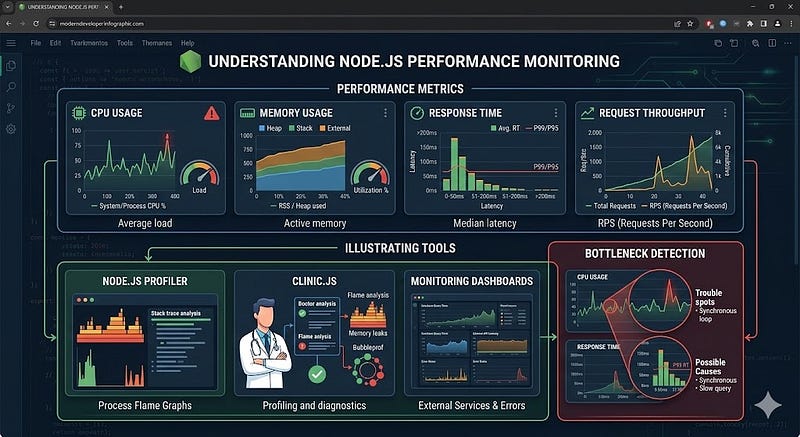
You can’t optimize what you don’t measure.
Monitoring tools help detect slow operations and bottlenecks.
Useful Tools
- Node.js built-in profiler
- Clinic.js
- New Relic
- Datadog
Example:
console.time("operation");

// code
console.timeEnd("operation");
This simple technique helps identify slow code paths.
Key Takeaways
Here are the most important lessons for improving Node.js performance:
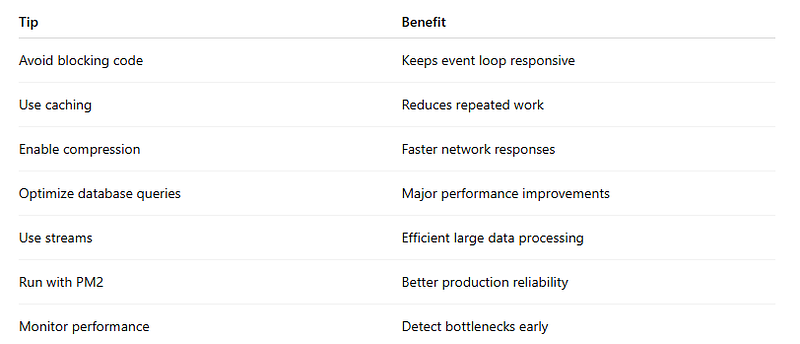
Small optimizations across these areas can significantly improve speed, scalability, and stability.
Next Steps
If you want to improve your Node.js applications further:
- Implement Redis caching
- Add database indexes
- Use load balancing
- Explore worker threads for CPU-heavy tasks
- Set up application monitoring
Performance optimization is not about a single trick, it’s about systematic improvements across the entire stack.
Strong Call to Action
Try implementing two of these techniques in your current Node.js project today.
Even small improvements can dramatically reduce response times and improve user experience.
And if you’re interested in more practical backend tips, keep exploring performance patterns used by modern production systems.







Leave a Reply